Product design · Studio collaboration
Accord
From feedback to a clear decision.
Helping small design studios turn a conversation about a design into a clear decision on the right version.
- Focus
- Product thinking, information architecture & UI/UX
- Project
- Design review workspace · 2026
- Platform
- Desktop web workspace
The brief
One homepage. Three people. A shared path from the first review to the approved file. Follow the decisions that shaped Accord’s review experience.
01
The starting point
The design is ready. The decision is still somewhere in the conversation.
A designer sends a homepage for review. The client responds with a suggestion. A studio lead adds another note. A revised file follows. Before the next change can begin, someone has to work out which version everyone means and what has actually been agreed.
This is the situation I designed Accord around: small studios moving creative work between a designer, a studio lead, and a client. The project asks how a review workspace could keep the design, the conversation, and the next decision together.
To explain the design, this case study follows one illustrative homepage review for North Studio. The people and comments shown in the screens are demonstration content, rather than interview findings.
02
Finding the focus
I started with the gap between sending a file and knowing what to do next.
A deadline tells a designer when work is due. An assignment tells them who owns it. Neither explains whether a client is reviewing the latest file, whether a comment needs an answer, or whether the work has been approved.
I framed the problem around those moments of uncertainty. My hypothesis was that attaching feedback and decisions to a specific version could make the handoff clearer. Scattered messages and outdated files remained problems to investigate, rather than findings I could claim from interviews.
The opportunity was a clearer review cycle.
The desk research pointed to existing approaches: contextual comments, version comparison, and explicit review decisions. The linked agency account and product documentation helped establish relevant patterns; they did not prove that studios would adopt Accord.
That shifted the design question from how many features to include to how clearly one review could move forward. I focused on the information each person needs at the moment they have to act.
03
One clear task
Take one deliverable from “please review” to an approved version.
I chose one homepage design as the deliverable, meaning the item being reviewed. The designer prepares it, the studio lead checks it internally, and a named client approver makes the final decision.
At each step, the interface needed to answer three questions: Which version am I looking at? What needs attention? Who acts next? Those questions became the thread connecting the overview, the viewer, the feedback states, and the handover.
04
Setting boundaries
I kept the wider studio in view, then followed one piece of work.
I designed the information architecture, review flow, interface screens, and shared component system. The overview accommodates several clients and projects, while the detailed screens follow one review and revision cycle.
I left payments, hiring, contracts, and time tracking outside the project. Adding them would have expanded the workspace without answering the central question. The design effort stayed with the transition from a file to feedback, a revision, and a recorded decision.
The structure moves from studio overview to project, then to the current deliverable and its review history. This gives the studio lead a way to scan the work while giving the client a direct route to the item that needs a decision.
05
The key decisions
The studio lead needed a place in the flow.
A direct designer-to-client conversation is only one way a review can happen. I included an internal check before the client review, so the studio can align on the work before asking for an external decision.
I also considered feedback received on a call. A lead should be able to record that feedback while identifying whose request it represents. Recording a note must remain separate from approving work on the client’s behalf.
A finished comment is not an approved design.
This distinction shaped the rest of the experience. Resolving a comment means the team has dealt with that request. Approval means a named person has accepted a specific file version. Combining those actions would leave the status of the whole design unclear.
I therefore kept comment states and review decisions separate. I also made the current version the default destination, with previous versions available for comparison. Earlier feedback keeps its original context instead of silently moving onto a changed layout.
For this design, one named client approver owns the final decision. That keeps the review understandable, but studios needing several approvers would require further exploration.
06
Following the review
First, give everyone the same place to begin.
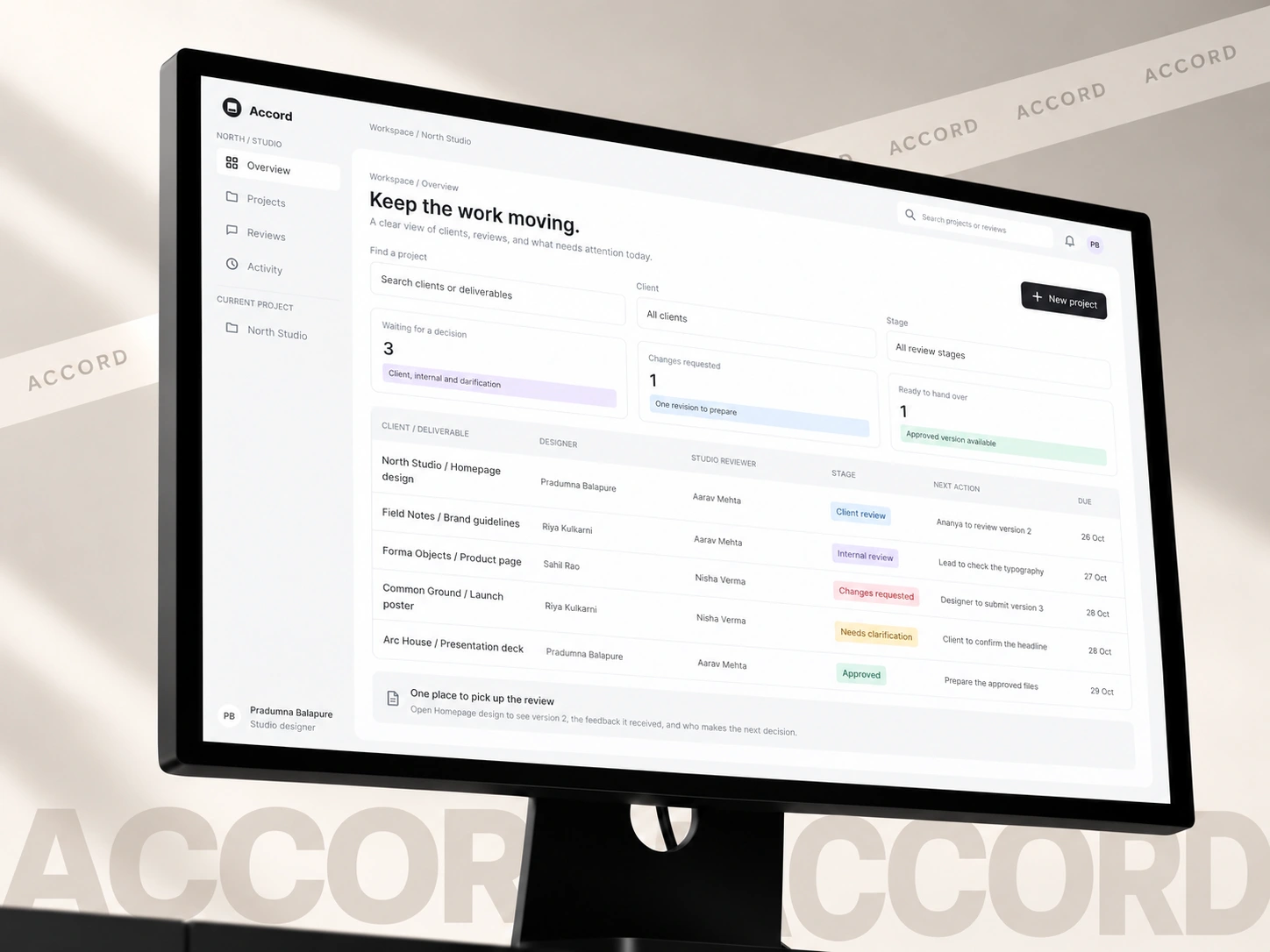
The studio overview brings the deliverable, designer, reviewer, stage, deadline, and next action into the same row. A lead can see where a decision is waiting before opening the project.
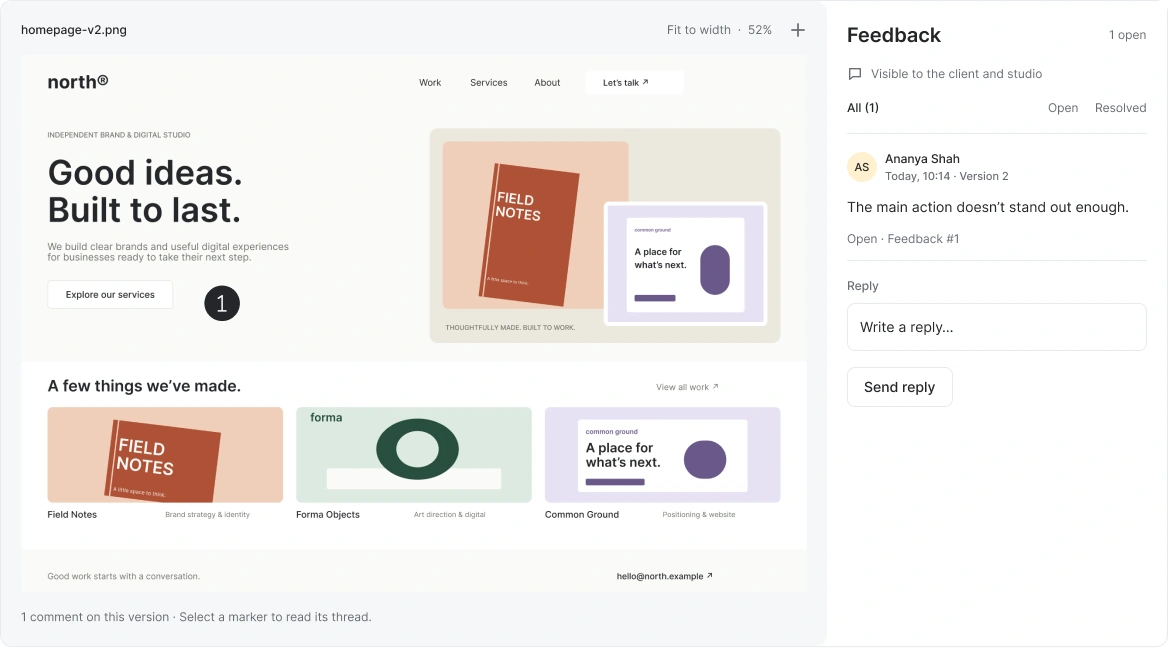
Inside the review, the current file sits beside its feedback. The brief and responsible people stay nearby. I gave the design most of the space and attached the comment to a specific area, so the client can point to the issue instead of describing its location in another message.
Then, turn a vague comment into an actionable request.
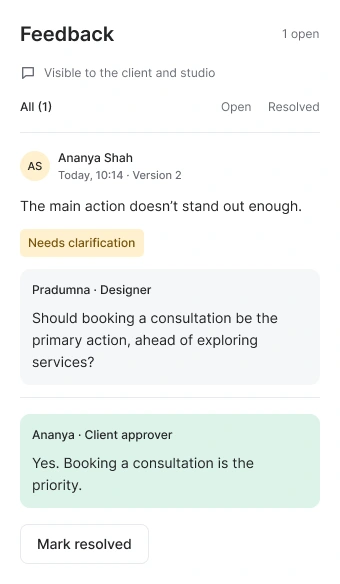
In the example, the client writes, “The main action doesn’t stand out enough.” That identifies a concern, but it leaves the designer guessing whether to change the wording, emphasis, or intended action.
The designer asks whether booking a consultation should be the priority. The client confirms it in the same thread. I used a “Needs clarification” state to make this waiting point visible, preserving the answer beside the original request.
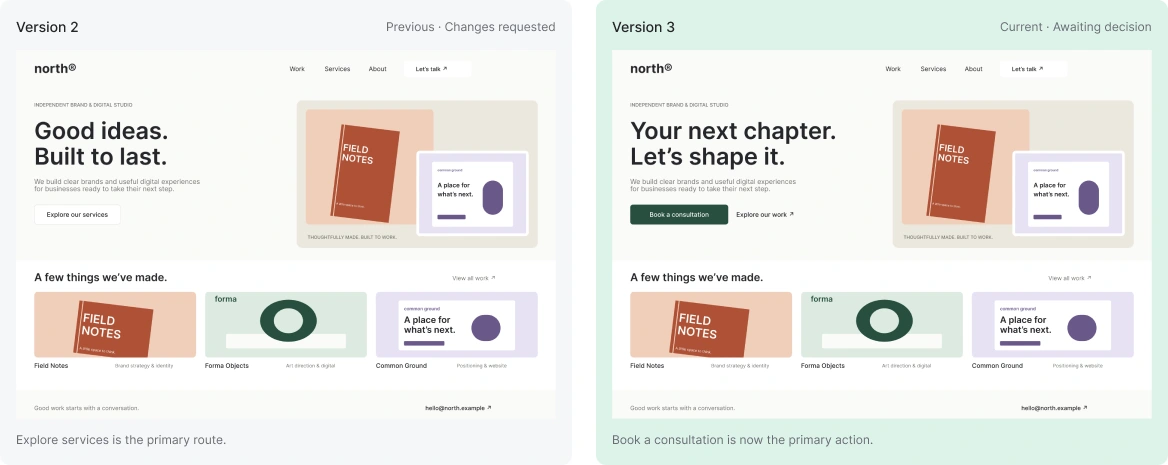
The next revision can now follow a specific direction: make “Book a consultation” the primary action and keep exploring the work secondary. The reason for the change remains visible to the next reviewer.
Before approving, make the change easy to check.
The comparison view places the previous and current designs side by side, with explicit version labels. The reviewer can check whether the revision addresses the request before resolving its feedback.
I kept the final decision separate. “Request changes” leaves the version unapproved and sends work back for revision. “Approve version” names the exact file being accepted. In the proposed flow, unresolved feedback must be dealt with first; that rule still needs testing with teams that allow non-blocking suggestions.
A later revision starts another review. It cannot inherit an approval given to an earlier file. This keeps a decision attached to the work the client actually saw.
Finally, let the review end with something clear to hand over.
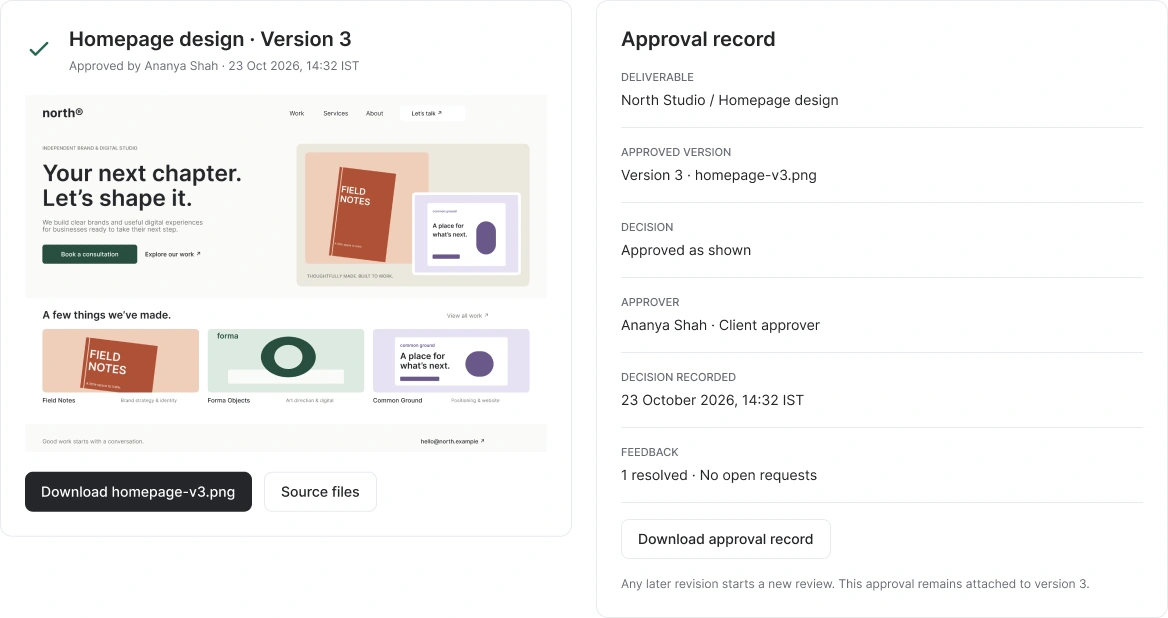
Once the client approves version 3 in the example, the handover brings its download and approval record together. The record identifies the approver, the version, and the time of the decision.
The approved file becomes the main action, while the history remains available for reference. The designer and client can leave with the same understanding of what was accepted, without rebuilding the decision from the conversation.
07
The outcome
One deliverable. A clear path to approval.
Accord connects feedback, revisions, and approval around a single design deliverable. Clients comment on specific areas, designers clarify requests, and reviewers compare versions before making a decision.
Three decisions hold the workflow together: feedback belongs to a specific version, resolving a comment does not approve the design, and approval identifies the exact file ready for handover.
What I delivered
A component library, detailed interface designs, and a connected prototype covering project overview, contextual comments, revision comparison, feedback management, approval, and handover.
What still needs validation
The workflow needs to be tested with designers and client approvers, particularly whether they can recognise the latest version and distinguish completed feedback from final approval.
Initial desk research · consulted 23 October 2026